Flu Vaccine Dashboard
What’s the Flu Vaccine Dashboard?
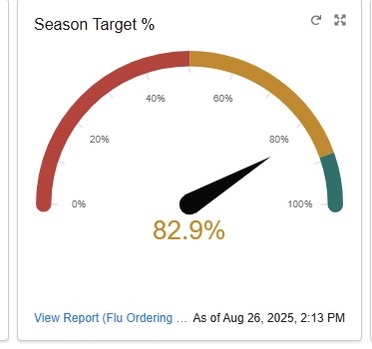
Your flu vaccine dashboard is a simple, yet powerful tool for your clinic team to monitor and improve your clinic’s VFC flu vaccine ordering and administration. The flu vaccine dashboard displays real-time data to help you better understand how well your clinic is doing in meeting its season target.
The flu vaccine dashboard is located on your myCAvax account. Want help navigating? Take a tour by clicking this 14-minute myCAvax COVID Flu Dashboard Demonstration tutorial or refer to the Knowledge Center for step-by-step guidance.
What’s a “Season Target”?
Your clinic’s customized VFC flu vaccine season target is based on the amount of other routine vaccines ordered from VFC in the past season. Your administration season target is based on self-reported doses, not doses reported to CAIR.
Special Features
- Monitor progress towards your flu targets throughout the season. An easy-to-read dial graphic displays how close you are to your target: “Needs Improvement” (0%-50%), “Good” (51%-70%), “Very Good” (71%-89%), and “Excellent” (90%-100+%).
- Get your data in real-time. Log in anytime to check your progress. Make sure to refresh the page for updated results.
Maximize the Use of Your Dashboard
To help ensure your flu vaccine records were submitted to CAIR accurately, run a Doses Administered report in CAIR and compare the number of doses shown in the report with the number of doses you self-reported in myCAvax. The CAIR2 Regular User Guide (PDF) includes instruction on how to run a doses administered report.
What are the Benefits of Using the Dashboard?
- Improve your flu vaccine uptake
- Better serve your patients and community
- Boost your clinic’s QI metrics
- Get CDPH recognition with a certificate of achievement when reaching “Excellent” and making “Great Strides” (improved flu ordering by 30% or more compared to your performance in the previous season).
What Else Can I Do to Improve Vaccine Uptake?
To help meet your season target, make sure to
- Implement the Flu Action Plan (PDF)
- Share flu materials with patients
- Review Tips for Speaking with Parents about Flu Vaccine